Solving Magento Order Line Item Exports for Fulfillment Teams
A high-performing e-commerce store lives and dies by its warehouse fulfillment speed. However, for teams running on Adobe Commerce (Magento), a massive operational bottleneck exists right out of the box: Exporting Order Line Items cleanly.
When operations managers use Magento's native "Export Orders" functionality to generate a CSV for their pick-and-pack teams, the resulting spreadsheet is notoriously chaotic. This post explains exactly why the default export fails, the "one row per line item" pattern that works, and the Google Sheets + Apps Script architecture that makes it easy to maintain.
The Default Export Nightmare
Magento natively associates order data sequentially. This means if Order #1001 contains three different products, the default CSV behavior will either:
- Cram all three SKUs and quantities into a single, comma-separated cell, rendering it impossible to filter, sort, or sum in Excel.
- Generate nested rows that break standard pivot tables and automated warehouse parsing tools, because the order-level fields (customer email, shipping address, order status) only appear on the first row and are blank on the others.
Fulfillment teams are then forced to manually clean this data every single morning—splitting cells, duplicating customer addresses for multi-item orders, deleting blank spaces, and reconstructing order-level context for every line item. Three different warehouse associates produce three different versions. Someone misreads a SKU. A shipping address gets attached to the wrong line item. Packages go to the wrong customer.
This introduces dangerous human errors: mis-packing shipments, delaying orders, missing SKU-variant differences (size, color), and raising customer service costs when buyers receive the wrong thing. At 100+ orders per day, the cleanup work alone consumes an hour of warehouse-lead time — every single day.
The "One Row Per Line Item" Solution
To optimize warehouse picking, the core requirement is strict parity: One Product = One Row.
Instead of fighting the native Magento CSV exporter, modern operations solve this by tapping directly into Magento's REST API. By doing so, you can fetch the raw JSON payload of an order, parse out the items array, and write each individual product into a crisp, flat row in a database or spreadsheet. (This post is part of our Magento 2 order sync pillar, which goes deeper on the full pipeline.)
If Order #1001 has three items, the system generates three distinct rows. Each row contains the specific SKU and quantity, alongside duplicated overarching order data (like the Shipping Address and Order ID), ensuring the warehouse parser can group them correctly via the order ID and pick them individually via the SKU.
The Ideal Row Structure
A well-designed flattened row contains:
- Order-level fields (repeated on every line item):
- Order ID (or increment ID, customer-facing)
- Customer email
- Customer name
- Shipping address (flattened: street, city, region, postcode, country)
- Shipping method
- Order status (pending, processing, complete, etc.)
- Order total
- Placed at timestamp
- Line-item-level fields (unique per row):
- SKU (the simple/shippable SKU, not the configurable parent)
- Product name
- Quantity ordered
- Quantity shipped (for partial fulfillment)
- Unit price
- Row total
- Variant attributes (size, color, etc.)
- Warehouse workflow fields (added by your process):
- Pick status (picked, not-picked)
- Pack status
- Ship label printed (yes/no)
- Assigned associate
With this structure, every warehouse query is one filter away. "Show me all unpicked items going to California" is a Sheet filter. "Give me the pick list for today's morning shift sorted by shelf location" is a sort on SKU + pick status.
Handling Configurable, Bundle, and Grouped Products
Magento's product types create subtle traps in the line-item flattening:
- Configurable products: Appear as two entries in
items[]: the parent (typeconfigurable) and the selected child (typesimple). The parent has the configurable SKU; the child has the physical warehouse SKU. Always keep the child, drop the parent — otherwise the warehouse tries to pick a SKU that has no physical stock. - Bundle products: Multiple children per parent, with each child having its own
bundle_selection_qty. Keep all the children, with quantity multiplied by the bundle selection quantity. - Grouped products: Similar to bundles — keep the children, not the group parent.
- Downloadable and virtual products: Don't need warehouse picking at all. Filter them out of the flattened export.
Getting these right the first time saves the warehouse from confusing pick tickets and hours of "wait, where's this SKU?" questions.
Bringing it to Google Workspace
You don't need an expensive third-party ERP to achieve this clean data flow. Tools like the Magento Order Manager leverage Google Apps Script to connect directly to your Magento API.
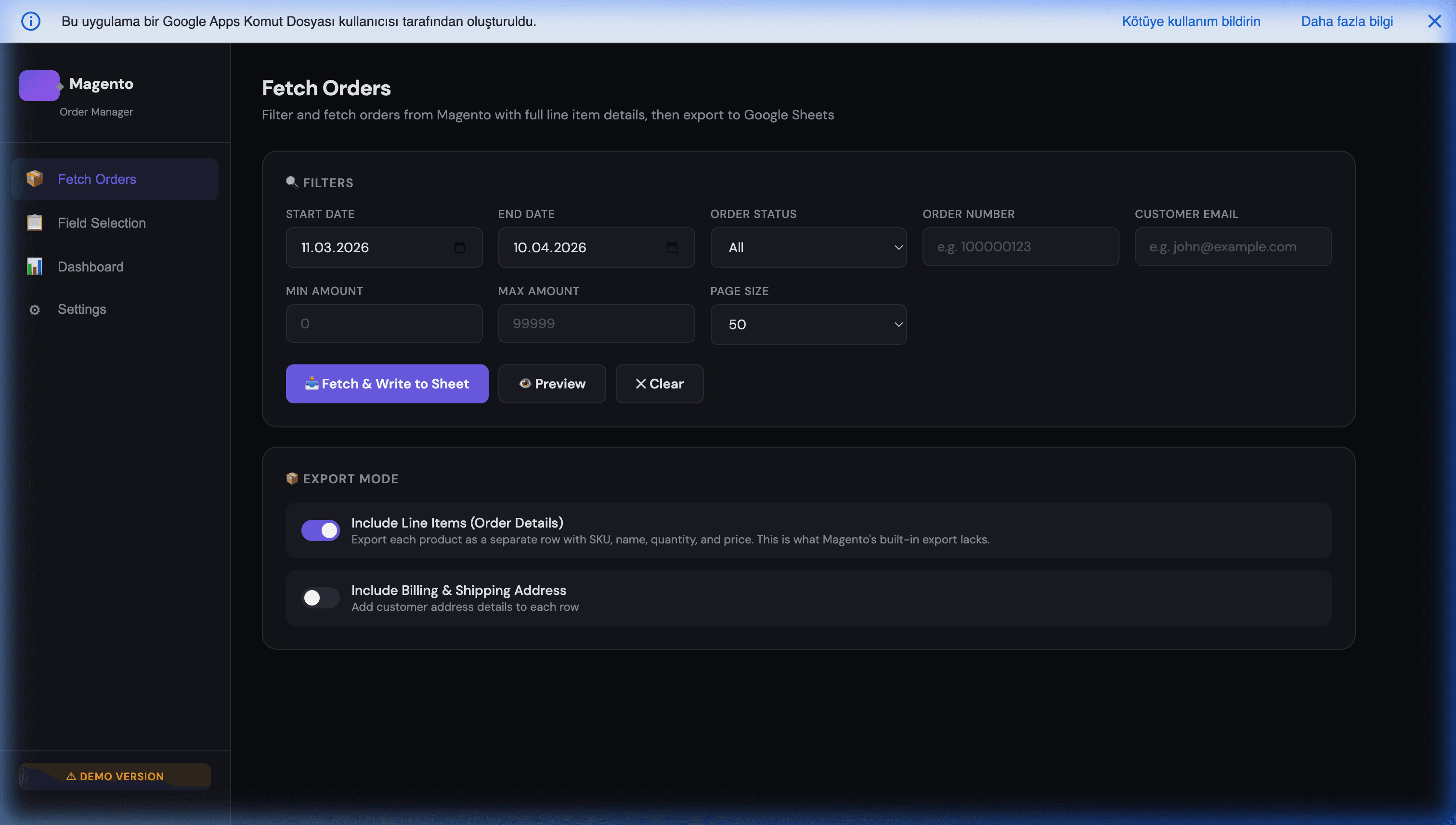
Through its spreadsheet-first interface, users simply select their desired fields and toggle the vital "Include Line Items" switch. The script fetches the live orders and perfectly flattens the multi-item payloads into a pristine Google Sheet format. It's an instant, automated solution replacing hours of daily Excel data-cleansing, allowing your warehouse to focus strictly on shipping boxes rapidly and accurately.
The sync runs on a schedule (every 10-15 minutes during business hours) or on webhook trigger (near-real-time). A custom menu in the Sheet gives the warehouse lead "Refresh Now", "Mark Picked", and "Generate Pick List PDF" buttons — all without ever touching the Magento admin.
Common Pitfalls
- Forgetting to filter out configurable parents. Warehouse gets instructed to pick a SKU that has no physical inventory. Easy fix: filter by
product_type === 'simple'or equivalent. - Not handling partial shipments. An order of three items where two shipped yesterday has only one left to pick today. Include
qty_shippedand filter onqty_ordered - qty_shipped > 0for open picking work. - Pulling the entire order history every sync. Use
updated_atfilters to only pull recently-changed orders. Incremental sync is 100x faster than full sync. - No retry logic on API failures. Magento's REST API occasionally returns 429 or 503 under load. Build exponential backoff into the Apps Script — the fetch will succeed on retry in >99% of transient failures.
- Writing the Sheet with unbounded ranges. As the Sheet grows past 50k rows, unbounded formulas (
=QUERY(A:Z, ...)) slow to a crawl. Always use explicit bounded ranges or archive old data into separate yearly Sheets.
Getting Started
Replacing Magento's native CSV export with a flattened API-based pipeline is one of the highest-ROI operational changes a warehouse can make. The cost is a few days of development; the benefit is hours of daily time saved and a dramatic drop in pick-error rate.
Our Magento Order Manager ships with the line-item flattening built in, along with Apps Script triggers, field selection, and the full audit trail your finance team needs.
Further Reading
- Magento 2 order sync with Google Sheets — the full pillar covering the sync architecture.
- Analyzing Magento revenue and orders in Google Sheets — the revenue-analysis side of the same pipeline.
- Syncing Google Sheets with Magento at scale — the write-back direction (Sheets → Magento).
- Triggering Magento API from Sheets — executing Magento actions from a Sheet button.
- Magento automated invoice via Google Docs — another use case for the same order-sync foundation.
- The complete Magento + Google Sheets automation playbook — orders, inventory, invoices, B2B CRM, and AI in one overview.
Frequently Asked Questions
Why can't I just use Magento's native 'Export Orders' CSV and split the rows myself?
You can, but it wastes hours of warehouse time every morning and introduces data errors. The native export either concatenates multiple SKUs into one cell (unparseable) or generates nested rows that break pivot tables and warehouse automation software. Manually splitting these with Excel formulas works for small volumes but collapses at 200+ orders per day. The API-based approach is write-once, run-every-morning, and produces zero manual-cleanup work.
Which Magento REST API endpoint gives me clean line items?
`/rest/V1/orders` with the `items[]` array expanded. You iterate through the orders endpoint, then for each order, iterate through its `items[]` array and emit one row per item. Include order-level fields (order ID, customer email, shipping address, order status) on every line-item row so the warehouse team can filter by any of them. Filter at the API level (`searchCriteria[filter_groups][0][filters][0][field]=status&...=processing`) to only pull unshipped orders.
How do I handle configurable and bundle products in the export?
Configurable products appear as two entries in `items[]`: the parent (configurable) and the selected child (simple). For warehouse picking, you want the child SKU (the physical one being shipped), not the parent. Filter out rows where `product_type === 'configurable'` and keep the simple children. Bundle products work similarly but can have multiple children per parent — keep all the simple children in that case, with quantity adjusted by the bundle_selection_qty.
What if a warehouse team needs the export in their ERP system, not a Sheet?
The same Apps Script that populates the Sheet can also push the flattened data directly to the ERP API (SAP, NetSuite, QuickBooks Commerce, ShipStation, etc.). Most teams prefer the Sheet as the intermediate visible-audit-trail layer: Apps Script → Sheet → ERP. If something looks wrong downstream, you can inspect the Sheet to see exactly what was sent. Going Apps Script → ERP directly is fine but removes that diagnostic visibility.
Can this run in near-real-time for hot-release drops where orders flood in?
Yes. Instead of polling the orders endpoint on a schedule, subscribe to Magento's `sales_order_save_after` event via a webhook and push directly to an Apps Script doPost endpoint. Each new order triggers an immediate line-item flatten and append to the Sheet. We cover the webhook pattern in our [Magento 2 order sync pillar](/blog/magento-2-order-sync-google-sheets).