Automated B2B Invoices: Magento 2 to Google Docs & PDF
Hey everyone! Welcome back to MageSheet.
One of the biggest complaints we hear from B2B merchants running Adobe Commerce (Magento 2) is about the native PDF invoicing system. Magento’s default PDFs are notoriously difficult to customize. Making a simple change to the font, adding a second company logo, or adjusting a table column often requires a developer to write complex Zend PDF override classes.
In a B2B environment, your invoice isn’t just a receipt—it’s a legal document. It needs PO numbers, specific net terms, tax exemptions, and sometimes even dynamic banking details depending on the currency.
What if your accounting team could design the perfect invoice template in Google Docs, and every time a Magento order is placed, that template is automatically populated, converted to a PDF, and emailed to the customer?
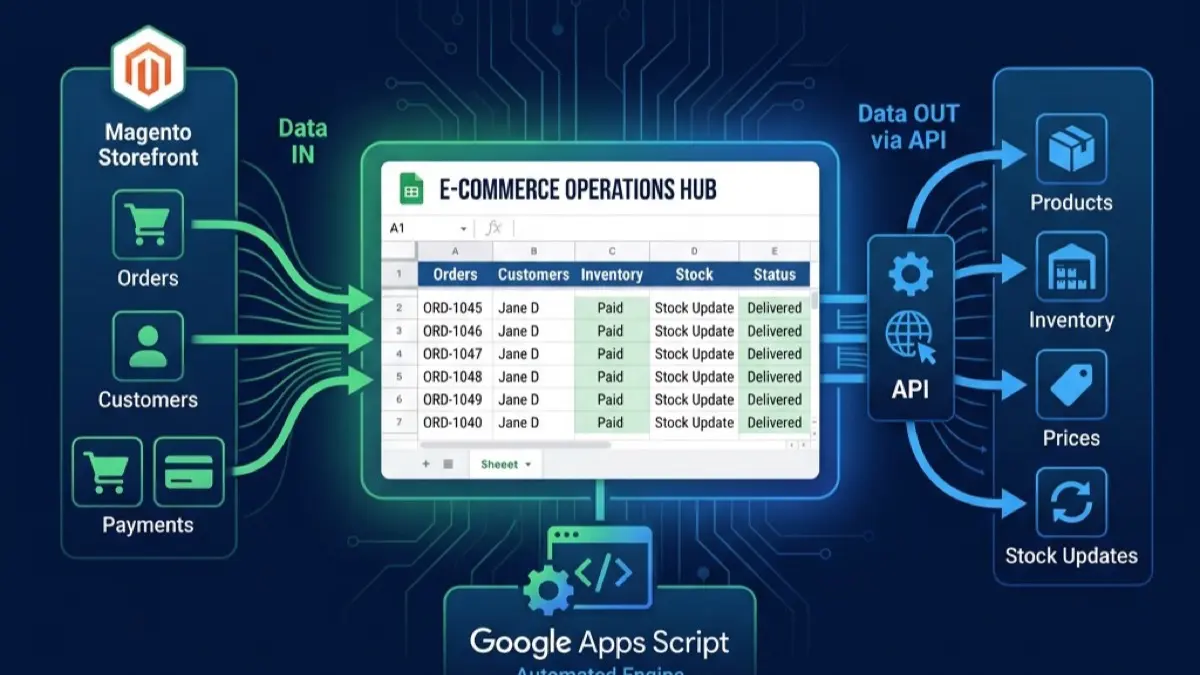
Today, we're building an automated document generation factory using Apps Script.
The Architecture
Here is the flow we are going to build:
- Magento fires an order Webhook (as we built in our Order Sync Guide).
- Apps Script receives the JSON payload.
- Apps Script makes a copy of a "Master Invoice Template" in Google Docs.
- Apps Script searches the document for placeholder tags like
{{ORDER_ID}}and replaces them. - Apps Script exports the configured Doc as a PDF.
GmailAppemails the PDF to the client.
Step 1: Create the Google Docs Template
Go to Google Docs and create a beautifully formatted invoice. Use all the fonts, colors, and tables you want. Wherever you need Magento data to appear, write a placeholder tag wrapped in double curly braces:
{{ORDER_ID}}{{CUSTOMER_NAME}}{{GRAND_TOTAL}}{{DATE}}
Note the Document ID from the URL (the long string of characters between /d/ and /edit).
Step 2: The Document Generation Script
Now open Google Apps Script and let's write the worker function.
This script accepts an orderData object, duplicates your template, performs a regex replacement, formats the PDF, and sends the email.
// Code.gs

// The ID of your beautiful Google Doc template
const TEMPLATE_DOC_ID = "1A2B3C4D5E6F7G8H9I0J_your_template_id";
// The ID of a Google Drive Folder where generated PDFs should be saved
const OUTPUT_FOLDER_ID = "0Z9Y8X7W6V_your_folder_id";

function generateAndEmailInvoice(orderData) {
  // 1. Get the Template and the Output Folder
  const templateDoc = DriveApp.getFileById(TEMPLATE_DOC_ID);
  const outputFolder = DriveApp.getFolderById(OUTPUT_FOLDER_ID);

  // 2. Make a temporary copy of the template
  const newFilename = `Invoice_${orderData.increment_id}_${orderData.customer_name}`;
  const tempDocFile = templateDoc.makeCopy(newFilename, outputFolder);
  const tempDocId = tempDocFile.getId();

  // 3. Open the new document to replace the text
  const doc = DocumentApp.openById(tempDocId);
  const body = doc.getBody();

  // 4. Perform the replacements
  body.replaceText("{{ORDER_ID}}", orderData.increment_id);
  body.replaceText("{{CUSTOMER_NAME}}", orderData.customer_name);
  body.replaceText("{{GRAND_TOTAL}}", "$" + parseFloat(orderData.grand_total).toFixed(2));

  // Format the date nicely
  const today = Utilities.formatDate(new Date(), "GMT", "MMMM dd, yyyy");
  body.replaceText("{{DATE}}", today);

  // Save and close the document to ensure changes apply before PDF conversion
  doc.saveAndClose();

  // 5. Convert to PDF
  const pdfBlob = tempDocFile.getAs(MimeType.PDF);
  pdfBlob.setName(`Invoice_${orderData.increment_id}.pdf`);

  // 6. Email the client
  const emailSubject = `Your Invoice for Order #${orderData.increment_id}`;
  const emailBody = `Hi ${orderData.customer_name},\n\nThank you for your business. Please find your invoice attached.\n\nBest,\nYour Company`;

  GmailApp.sendEmail(orderData.customer_email, emailSubject, emailBody, {
    attachments: [pdfBlob],
    name: "Billing Department"
  });

  // Optional: Trash the temporary Google Doc if you only want to keep the PDF
  // tempDocFile.setTrashed(true);

  Logger.log("Invoice generated and sent to " + orderData.customer_email);
}
Connecting it to the Webhook
If you read our previous webhooks article, you know how to receive data via doPost(e). You simply take the parsed payload.order_data and pass it into this function:
function doPost(e) {
  const payload = JSON.parse(e.postData.contents);

  // ... Security checks ...

  // Pass the order data to our new invoice generator!
  generateAndEmailInvoice(payload.order_data);

  return ContentService.createTextOutput("Success");
}
The Power of No-Code Formatting
Think about what we just achieved. If your accounting department decides next week that they need to add a "Late Payment Warning" to the bottom of all invoices, they don't need to call a developer.
They simply open the Google Doc template, type the new text, make it bold and red, and close it. The next Magento order that comes in will automatically feature the new design.
This decouples the visual design of your business documents from the codebase of your e-commerce platform.
At MageSheet, we build these specialized, highly decoupled workflows for enterprise Magento merchants. Want to stop fighting Zend PDF and start using tools your team already knows? Reach out to us today.