
Leadflow AI — WhatsApp CRM for Google Sheets
Stop manually replying to WhatsApp leads. Let AI handle the chat 24/7 — straight from your Google Sheet.
Your customers message you on WhatsApp. Leadflow AI captures every lead into a Google Sheet, replies for you with the latest OpenAI models 24/7, and lets you take over any conversation with one click. Run mass campaigns, tag customers, and never miss another sale — without paying $50–$500 a month for a CRM that locks your data away. One-time purchase. You only pay Twilio (per message) and OpenAI (per reply) at their standard rates.
The Problem
Why this matters
Every WhatsApp message you don't reply to within minutes is a lost sale. But hiring a full-time agent costs thousands per month, and tools like HubSpot, Zoko, or Wati charge $49–$499/month per seat — then lock your customer data inside their platform. You end up either burning hours typing the same answers, or paying for a CRM that you don't actually own.
The Solution
How we solve it
Leadflow AI works while you sleep. When a customer messages your WhatsApp number, the lead lands in your Google Sheet within seconds and an AI assistant — powered by the latest OpenAI models — replies in their language, answers product questions, and even fills in their name, email, or any field you ask for. When something needs your touch, one click silences the AI and you take over from the same screen. Run mass campaigns to tagged audiences, import leads from CSV, and define what tools the AI can use — all from a clean dashboard inside your own Google Sheet. You own the data, the prompts, the customer list. We just give you the engine.
The Results
What you get
- Replace hours of weekly typing — stop sending the same answers to the same questions
- Reply to every lead in seconds, even at 3am or on weekends
- Cancel your $50–$500/month CRM subscription — pay once, own forever
- Take over any conversation with one click when the deal needs a human touch
- Send promo blasts to thousands of customers with one campaign — no copy-paste
- See exactly when each message was delivered and read, just like in WhatsApp itself
- Try every screen and feature in demo mode before you connect anything
- Keep all your customer data inside your own Google Sheet — yours to export, back up, or migrate
Interactive Product Tour
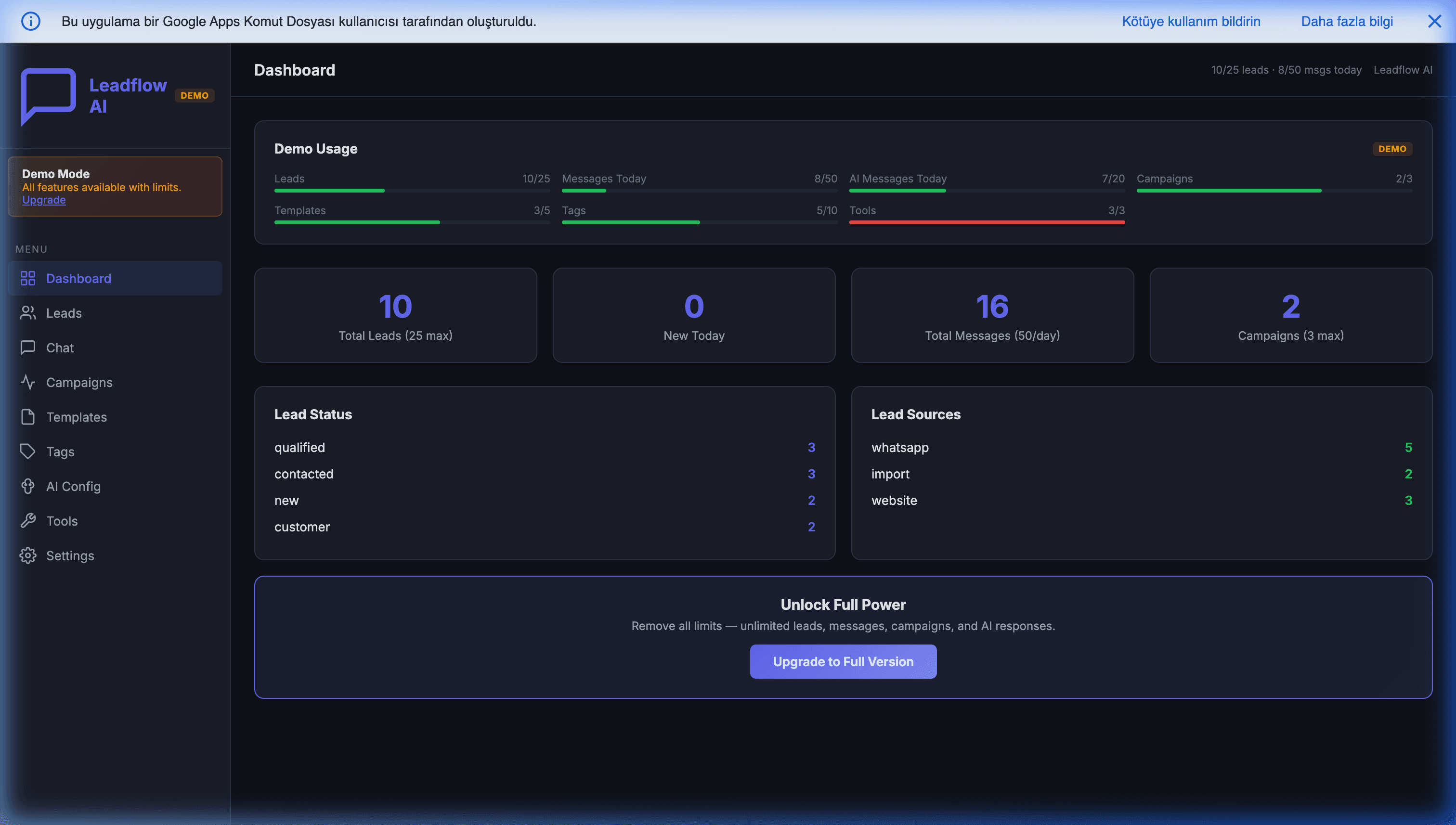
A click-through demo with realistic sample data. Browse tabs, filter tables, explore the UI. Save, import, and other write actions happen for real in the live app — one click away.
Key Features
Chat With Customers Like You're On WhatsApp
Same look, same delivery ticks, same flow your customers already know. You see when each message is sent, delivered, and read — so you know exactly where every conversation stands. New messages pop in live, no refresh needed.
An AI That Replies For You, 24/7
Powered by OpenAI's latest models (we keep the integration current as new ones launch). The AI greets your customers, answers their questions, and asks for their name, email, or anything else you tell it to collect — in whatever language they're writing. Costs you fractions of a cent per reply.
Hand Off To A Human In One Click
When a conversation needs your personal touch — a high-value lead, a sensitive complaint, a closing call — flip a single toggle. The AI goes silent immediately and you reply from the same screen. Flip it back when you want the bot to take over again.
Teach The AI Your Business
Want the AI to check stock? Look up an order? Book a meeting slot? Save a custom field to your sheet? Add your own tools in a few lines of code (or have us do it for you). The AI decides when to use them — you decide what they do.
Send Promos To Thousands At Once
Pick which customers to message — by tag, status, or any custom field — choose a pre-approved WhatsApp template, and hit send. The system handles delivery rate limits and even schedules follow-up reminders for non-responders. No more copy-pasting one chat at a time.
Bring Your Existing Customer List
Have leads in a spreadsheet, an old CRM, or a CSV export? Upload it, point us at the phone and name columns, and they're imported in seconds. Add default tags, skip duplicates, or update existing records — your call.
Your Customers, Your Sheet, Your Rules
Every customer, every message, every AI prompt lives in your own Google Sheet — under your Google account. Nothing flows through us. Export, back up, or walk away whenever you want. No vendor lock-in, ever.
Optional Storefront Mode (v2.1+)
Add a Products tab with your menu or catalog and the AI will recommend items, quote prices, and log confirmed orders to a separate Orders tab — turning your WhatsApp into a mini storefront. Drop-in extension file, runs on the same install. Designed for cafés, makers, consultants, and anyone selling 5–30 SKUs without a website.
Google Workspace Integration
Works seamlessly with your favorite Google apps
What Does It Bring to Your Business?
Real business value, not just cool tech
Pay Once, Own Forever
No more monthly invoices for software you don't own. One purchase replaces $50–$500/month CRM subscriptions — and your customer list stays yours.
Get Hours Of Your Day Back
The AI handles the routine questions so you can focus on the conversations that actually need you. Aim: replace hours of weekly typing with a system that answers in seconds, around the clock.
Sleep Knowing You're Replying
While you're at dinner, on vacation, or asleep, your customers still get instant replies. No more waking up to a dozen unanswered messages.
Simple Pricing
Choose the plan that fits your needs
Standard
You install it yourself, typically in 15–30 minutes
- Complete source code, yours forever
- Step-by-step setup guide anyone can follow
- Try every feature in demo mode before going live
- 1 year of free updates (renewal at 50% after)
- Code-level setup support via email for 14 days from purchase, on a commercially reasonable basis during Istanbul business hours
- Eligible for 14-day refund under our Refund Policy
Managed Setup
Skip the setup — we hand you a working system
- Everything in Standard
- We configure your verified Twilio & OpenAI API keys
- We configure the base AI prompt & System Instructions
- We configure 1 basic custom AI function that reads from one tab of your Google Sheet (e.g., product lookup, FAQ lookup)
- Handover setup call (typically 30–45 minutes)
- 2 weeks of priority response on code-level questions
- *Requires verified Twilio, Meta, and OpenAI accounts on your side. WhatsApp Business API approval, more complex AI functions, multi-source lookups, and external integrations are Custom+.
Custom Build
We connect it to your existing systems
- Everything in Managed Setup
- AI tools that talk to your ERP, POS, or inventory system
- Integrations with whatever you already run
- Custom screens and reports built around how your team works
You own it forever — 100% unobfuscated source code, no subscription, no lock-in. Secure checkout via Gumroad.
Not sure it fits your setup? Ask us on WhatsApp before you buy →
Frequently Asked Questions
Everything you need to know
Three things, all things you already have or can get in a day: (1) a Twilio account — they're who actually deliver your WhatsApp messages, and you pay them directly per message (a few cents each); (2) an OpenAI account with a small balance for the AI replies; (3) a Meta Business account verified for WhatsApp — this is what makes your number an official WhatsApp Business sender. The Meta verification is a one-time setup that every WhatsApp business tool requires (HubSpot, Wati, Zoko — same step). It's not us asking, it's WhatsApp itself. The good news: you can try Leadflow AI today using Twilio's free Sandbox, no Meta verification needed yet — set Meta up only when you're ready to go live.
Yes. We host a live demo on this site — click the demo link on the product page and you'll land in a pre-loaded version of the full app: 10 sample customers, real-looking conversations, templates, tags, campaigns, every screen. It's running in our hosted instance so you can click around, see the UI, and judge the product without buying anything or installing anything. This is just for evaluation — the demo isn't your CRM, it's our showroom. Once you're convinced and buy, you install the code on your own Google account and you're running your own production system.
The complete source code — every file, unencrypted and yours to keep. You install it on your own Google account (we send a setup guide with two options: a 15-minute copy-paste install, or a one-command install using Google's free CLI tool). From that moment on, you're running your own copy of Leadflow AI on your own Google Sheet. No ongoing access from us, no dependency on our servers. If we disappeared tomorrow, your CRM would keep working forever.
No — and we couldn't even if we wanted to. Your copy of Leadflow AI runs entirely inside your own Google account: your Google Sheet stores the customer list and messages, and your Twilio and OpenAI API keys live in Google's own encrypted Script Properties (a secure storage that even the sheet can't read). Our servers are never in the middle. We never see your data, your keys, or your customers. Many companies ask us this — it's usually the deciding factor, especially for businesses handling sensitive customer conversations.
Twilio charges per WhatsApp message — usually a few cents per conversation, much less than what tools like HubSpot or Wati include in their monthly fees. OpenAI typically costs a few cents per AI reply with their default fast model, so most small businesses spend $5–$20/month on AI even with hundreds of conversations. You pay both directly at their public rates. We don't add markup or take a cut.
WhatsApp itself requires it. Whether you use Twilio, Wati, Zoko, or any other WhatsApp Business provider, your number has to be linked to a verified Meta Business — this is what stops spam on WhatsApp. It takes about 15 minutes to set up and Meta does the verification themselves. You can practice and test using the free Twilio Sandbox without any of this; Meta only enters the picture when you switch to your own production WhatsApp number. If you'd rather not deal with it, our Managed Setup tier handles the whole connection for you (you just need to own the account).
Leadflow AI uses OpenAI's chat-completion API, so you can pick whichever model fits your budget and quality target. The default is OpenAI's fast, low-cost option (typically fractions of a cent per reply — most businesses spend less than $5/month on AI). Want a smarter model? Switch it from the Settings screen, no code change. As OpenAI releases new models, you just pick the new name from your Settings — we don't have to ship an update.
Both. Out of the box, the AI replies and saves acquired info (name, email) directly into your Sheet. If you want it to do more (e.g., simple data lookup or booking a slot), you can add custom tools in Apps Script. Three basic tools ship ready to go. For advanced tools like scraping or external systems integrations, contact us for a Custom+ development quote.
One click and you're in. Every conversation has an AI toggle. Flip it off and the AI stops replying immediately — the customer's messages still come in live and you reply yourself from the same chat screen. Flip it back on when you're done and the AI takes over again. Perfect for VIP customers, complaints, or sales calls where the AI shouldn't speak for you.
No. You pay once, you own it forever. The only ongoing costs are what you'd pay anyway to send WhatsApp messages (Twilio) and run the AI (OpenAI) — both at their own normal rates, paid directly to them.
Your data never leaves Google. Every customer, every message, every AI prompt sits inside your own Google Sheet, under your own Google account. We don't have servers in the middle, we don't see your data, and there's nothing for us to leak. Your Twilio and OpenAI keys live securely in Google's own Script Properties (not in the sheet itself).
Yes — free updates for the entire current version line, including new features, bug fixes, and improvements. As we ship new things (and we ship often), you just download the latest file and you're current.
Standard plan assumes you can copy-paste files and follow a setup guide (typically 15–30 minutes for a non-technical admin). If that sounds like work, pick the Managed Setup tier and we install the core system for you, including 1 basic custom AI function (like spreadsheet lookup) and a handover call (typically 30–45 minutes). Need multiple tools, web scraping, or CRM integrations? That's what our Custom+ tier is for.
Ready to get Leadflow AI — WhatsApp CRM for Google Sheets — or want your own version built?
Buy it from $149, or book a free feasibility review.