Building a Free B2B CRM: Syncing Magento to Google Workspace
Hey everyone! Continuing our deep dive into Magento and Google Integrations on the MageSheet blog, it's time to talk about Customer Relationship Management (CRM).
If you are running Adobe Commerce (formerly Magento B2B), you are likely dealing with complex "Company Accounts", corporate buyers with specific roles, and negotiated tier pricing catalogs. When a large wholesale buyer registers on your site, waiting for a human admin to manually copy their data into your sales pipeline is unacceptable. Leads go cold fast.
Often, businesses pay massive licensing fees to sync Magento to Salesforce or HubSpot. But what if your sales team already lives inside Gmail, Google Contacts, and Google Sheets?
Today, we're going to build a serverless integration that automatically captures a new B2B customer registration in Magento, appends it to a "Sales Lead Pipeline" in Google Sheets, and creates a rich profile in Google Contacts—all natively, using Apps Script and the Google People API.
The Architecture
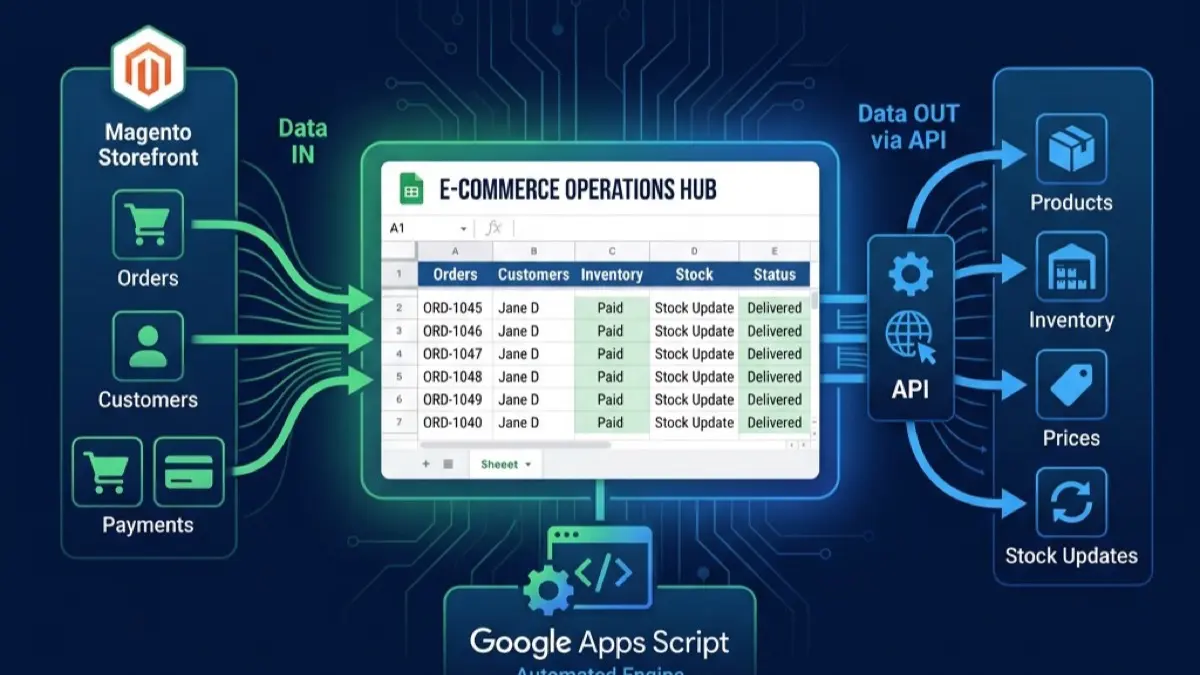
Just like our Order Syncing Guide, we rely on Magento's internal event dispatch system to detect a new customer, and Apps Script's doPost() to receive the payload.
- Magento Event:
customer_register_successor the B2B specificcompany_save_after. - Payload: Name, Email, Company Name, Tax ID, and Phone Number.
- Google Apps Script: Parses the data, adds a row to Google Sheets, and pushes a new contact to the Google People API.
Step 1: Prepping the Google Apps Script Backend
To use Google Contacts programmatically, you must use the "Advanced Google Services" panel.
- Create a new Google Sheet. Open Extensions > Apps Script.
- Click the + next to Services in the left sidebar.
- Look for People API and add it.
Now, let's write our Webhook listener inside Code.gs:
// Code.gs

const SECURE_TOKEN = "B2B_Lead_Sync_2026";

function doPost(e) {
  try {
    const payload = JSON.parse(e.postData.contents);

    // Auth Check
    if (payload.token !== SECURE_TOKEN) {
      return ContentService.createTextOutput("Forbidden").setStatusCode(403);
    }

    const customer = payload.customer_data;

    // 1. Add to the Google Sheets CRM
    appendToSheet(customer);

    // 2. Add to Google Contacts so the Sales Team sees it on their phones!
    createGoogleContact(customer);

    return ContentService.createTextOutput(JSON.stringify({status: "Success"}))
      .setMimeType(ContentService.MimeType.JSON);

  } catch (error) {
    return ContentService.createTextOutput("Error: " + error.message).setStatusCode(500);
  }
}

// Helper: Append to Sheet
function appendToSheet(customer) {
  const sheet = SpreadsheetApp.getActiveSpreadsheet().getSheetByName("Lead Pipeline");
  const timestamp = new Date();

  // E.g., [Date, Company Name, Contact Person, Email, Phone, Status]
  sheet.appendRow([
    timestamp,
    customer.company_name,
    customer.first_name + " " + customer.last_name,
    customer.email,
    customer.phone,
    "New Lead" // Default status
  ]);
}
The Magic: Writing to Google Contacts via People API
When a sales rep opens Gmail on their phone, they shouldn't have to search a spreadsheet to remember who they are calling. The contact should already be in their corporate Google Contacts book.
Let's look at the createGoogleContact() function using the People API:
function createGoogleContact(customer) {
  const contactResource = {
    "names": [
      {
        "givenName": customer.first_name,
        "familyName": customer.last_name
      }
    ],
    "emailAddresses": [
      {
        "value": customer.email,
        "type": "work" // Tags it specifically as a work email
      }
    ],
    "phoneNumbers": [
      {
        "value": customer.phone,
        "type": "workMobile"
      }
    ],
    "organizations": [
      {
        "name": customer.company_name,
        "title": "B2B Buyer Registration"
      }
    ]
  };

  // Push to Google Contacts!
  People.People.createContact(contactResource);
}
Deploy this as a web app. Once triggered, the new buyer will instantly appear in your Google Contacts connected to the executing account, and your sales pipeline sheet will automatically update.
Step 2: The Magento Payload
Over in your Magento instance, you’d create a simple Observer module listening to the customer_register_success event. Using cURL (or Magento's built in HTTP client classes), you POST a JSON payload matching the structure we designed above:
{
  "token": "B2B_Lead_Sync_2026",
  "customer_data": {
    "first_name": "Sarah",
    "last_name": "Lee",
    "email": "sarah.lee@omni-co.test",
    "company_name": "OmniCo Logistics",
    "phone": "555-0199"
  }
}
Why This Beats Traditional Hubspot/Salesforce Integration
For small-to-medium enterprises (SMEs) managing 10 to 50 B2B buyers a month, you absolutely do not need an enterprise CRM.
By turning Google Workspace into your central hub:
- Cost: You pay zero monthly fees per user.
- Speed: The People API sync is near-instant, pushing caller ID to your reps' mobile phones automatically.
- Flexibility: Next month, you can run a script over your "Lead Pipeline" sheet to automatically draft an email in Gmail or create a calendar invite in Google Calendar, entirely inside Apps Script.
If you are scaling out a complex Adobe Commerce B2B instance and want to connect it directly to your operational Google Workspace without expensive middleware, the engineers at MageSheet can handle the architecture for you. Explore our custom integration tools to learn more!