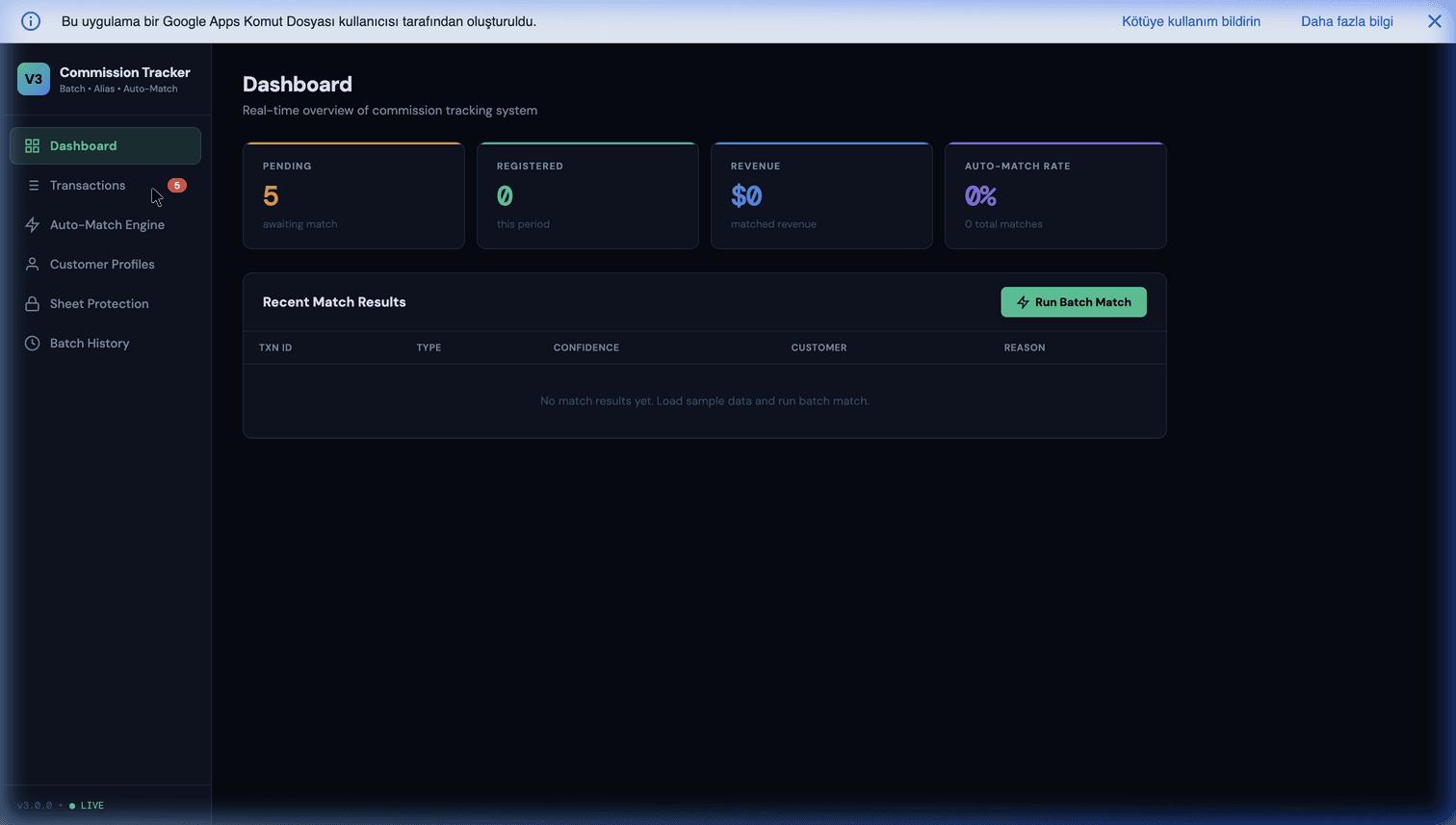
Commission Tracker in Google Sheets: Build an Automated, Audit-Ready System
If you manage a sales team or an affiliate network, you already know the dread of "Payout Week." Reconciling hundreds of micro-transactions, calculating tiered percentage splits, accounting for refunds, and ensuring the right representative gets credited is a painstakingly manual process that is intensely prone to human error.
Many agencies fall into the trap of using bloated, external commission-tracking SaaS products. Not only do these platforms take a percentage of your revenue or charge steep per-user fees, but they also force you to migrate sensitive financial data outside of your internal ecosystem. For a deeper architectural walkthrough, see our pillar guide on B2B sales commission tracking.
This post covers the Google Workspace + Apps Script architecture that replaces those SaaS tools, the security model that makes it production-safe for financial data, and the common pitfalls in tier logic and refund handling. For the full picture — how this fits alongside formulas, splits, clawbacks, and the Sheets-vs-software decision — start with the complete commission tracking guide.
Three Ways to Track Commissions in Google Sheets
Pick the path that fits where you are:
| Your situation | Best path |
|---|---|
| You want to build it yourself | This guide — architecture, security model, and pitfalls below |
| Multi-source (Stripe + Gumroad + WhatsApp) B2B sales | B2B sales commission tracking |
| You'd rather deploy a ready-made system | Sales Commission Tracker V3 |
| You're comparing against SaaS (QuotaPath, Spiff) | See the comparison below |
The Power of Apps Script for Payroll
What if your existing Google Workspace could handle complex financial reconciliation automatically?
By wrapping an intelligent Google Apps Script layer over a standard Google Sheet, you can transform it into a dedicated Commission Engine. Instead of employees manually entering data, the system relies on webhooks or CSV drops from your payment processors (Stripe, PayPal, FanBasis, Gumroad).
Once the raw data lands:
- The Engine Parses: It identifies the transaction type, the exact amount, and the associated customer identity (using the identity-resolution logic we cover in solving customer identity & alias pollution).
- The Engine Maps: It scans the customer profile to verify which sales representative originated the lead, based on your attribution rules (first-touch, last-touch, multi-touch weighted).
- The Engine Applies Tier Logic: It looks up the applicable commission rule for that rep at that date and cumulative revenue level, and computes the commission amount.
- The Engine Logs: Every calculation writes to an immutable audit row with timestamp, inputs, rule version applied, and output. Disputes become resolvable in minutes instead of days.
Handling Tiered Commissions the Right Way
Most agencies make the same mistake: they hard-code tier percentages into spreadsheet formulas. When tiers change (and they always do), they rewrite the formulas and silently break historical calculations.
The correct pattern is a dedicated Commission Rules tab:
| rule_id | rep_id | effective_from | effective_to | tier_1_cap | tier_1_pct | tier_2_cap | tier_2_pct | tier_3_pct |
|---|---|---|---|---|---|---|---|---|
| R-0001 | ALL | 2026-01-01 | 2026-06-30 | 10000 | 0.10 | 50000 | 0.15 | 0.20 |
| R-0002 | REP-007 | 2026-04-01 | null | 15000 | 0.12 | 75000 | 0.18 | 0.25 |
For each transaction, the Apps Script engine looks up the applicable rule based on:
- Transaction date (falls within
effective_from→effective_to). - Rep ID (exact match or "ALL").
- Rep's cumulative revenue at transaction date (determines which tier applies).
This architecture survives tier changes, rep-specific overrides, and retroactive corrections without breaking history. It also makes it possible to run "what-if" scenarios ("what would payouts look like if we switched to this tier structure?") by adding a new rule set and re-running.
Refund Handling Without Losing Audit Trail
When a refund arrives, your instinct might be to find the original commission row and delete it. Resist. Refunds get their own row with a negative amount, linked to the original transaction via a reverses_transaction_id column. At month-end, positives and negatives net out in the payout calculation.
Why this matters:
- Audit trail preserved. You can always see the original commission was earned and later reversed.
- Dispute resolution. If a rep disputes a reversal, the history is visible.
- Tax accounting. Commission earned in one tax period and reversed in another needs to be tracked separately; you can't do that if you deleted the original row.
- Trust. Reps who see disappearing commission rows lose confidence in the system fast.
Overcoming the "Who Edits What" Problem
The primary objection to using spreadsheets for financial data is security. "What if a sales rep accidentally zeroes out a column?"
This is why professional setups utilize Cell-Level Protection and Audit Trails. A robust system like the Sales Commission Tracker V3 enforces strict sheet protections. Sales representatives are restricted to viewing only their designated dashboards, while the core mathematical engine remains completely locked down for administrators. Furthermore, every automated batch run logs a timestamped "Audit History," ensuring 100% transparency.
The full security model:
- Master sheet: Write access limited to 2-3 finance admins. All others are locked out completely.
- Per-rep dashboards: Either as filtered views or as separate Sheets that IMPORTRANGE from the master. Reps see only their data, read-only.
- 2FA enforced: On every account with master-sheet access. Non-negotiable.
- Access audit log: Google Workspace Admin log reviews monthly to spot unusual access patterns.
- No raw API tokens in the sheet: All external API credentials live in
PropertiesService, never in cells.
Short on engineering time? This is exactly the kind of fixed-scope build we ship — a commission engine wired to your payment sources, with the rules tab, refund handling, and audit log already done. If you'd rather not write the Apps Script yourself, we can build this for you and hand over 100% of the source code in your own Google Workspace. Get a free feasibility review first — we'll tell you honestly whether a custom build or the ready-made tracker fits your setup.
The Month-End Workflow
Traditional commission reconciliation: 40+ hours of finance work, high error rate, constant rep disputes.
Automated workflow:
- Continuous capture: All transactions stream in via webhook in real time through the month.
- Continuous calculation: Commissions compute immediately; reps see updated totals on their dashboards daily.
- Day-1 freeze: On the 1st of the new month, a trigger freezes new commission writes for the prior month.
- Payout summary generation: Apps Script generates per-rep summaries with total, transaction breakdown, and any flagged disputes.
- Review window: Reps review their dashboards and file disputes within 3 business days.
- Dispute resolution: Finance handles disputes manually, files corrections, re-runs the summary.
- Payout export: Approved payouts export as a CSV for your payroll system or bulk bank transfer.
Finance time: ~4 hours/month of review. Calculation time: zero, it was continuous.
Common Pitfalls
- Hard-coding tier rules into formulas. Breaks every time tiers change. Use a rules tab.
- Deleting refund commissions instead of reversing. Kills audit trail.
- Granting broad access to the master sheet. Financial data needs tight access control.
- No dispute queue. Disputes happen; without a visible queue they pile up and create resentment.
- Not handling currency conversion. Multi-currency sales need a defined conversion point (transaction date vs. payout date) and it needs to be applied consistently.
Google Sheets vs Dedicated Commission Software
Tools like QuotaPath, Spiff, and CaptivateIQ are polished and worth it for large, complex sales orgs. For most SMBs and agencies, a Google Sheets commission tracker wins on the things that matter:
| Google Sheets + Apps Script | Commission SaaS (QuotaPath, Spiff) | |
|---|---|---|
| Cost | ~$0 on existing Workspace | $15–$40+ per user / month |
| Your financial data | Stays in your Drive | Lives in the vendor's cloud |
| Custom tier / attribution logic | Anything you can code | Limited to the tool's model |
| Setup | Build once (or deploy our template) | Configure within their constraints |
| Best for | SMBs, agencies, affiliate networks | Large enterprise sales orgs |
Rule of thumb: if a per-rep monthly fee buys features you'll actually use (deep CRM sync, ASC 606 revenue recognition, hundreds of reps), the SaaS earns its price. If you mainly need accurate, auditable payouts without the subscription, the Sheets approach is dramatically cheaper — and you own it.
Getting Started
Stop relying on frail formulas and manual data entry. Transition your commission tracking to a secure, automated Google Workspace environment, and turn Payout Week into just another automated Tuesday.
The Sales Commission Tracker V3 packages the full engine — rules management, identity resolution, refund handling, per-rep dashboards, audit log — into a deployable Google Workspace system.
Further Reading
- B2B sales commission tracking pillar — the broader commission architecture.
- Solving customer identity & alias pollution — the identity-resolution prerequisite for accurate attribution.
- Lead scoring autopilot in Google Workspace — the upstream lead-qualification piece.
- Replacing expensive SaaS CRMs with Google Workspace — the broader "own your infrastructure" argument.
- Gumroad lead generation machine — another commission-driven revenue channel.
Frequently Asked Questions
Is Google Sheets really secure enough for financial data and commission payouts?
For most SMB and mid-market use cases, yes — Google Workspace Business and Enterprise tiers are SOC 2 and ISO 27001 certified and include proper audit logging. The security risk is almost never the infrastructure; it's human access control. Lock the commission sheet down to finance-admins only for write access, grant sales reps read-only access to their own dashboards (filtered views), enable 2FA on all accounts, and review access logs monthly. Done right, this is actually more auditable than a SaaS commission tool where permissions are vendor-controlled.
How do I handle tiered commission structures that change based on quarterly performance?
Store the tier rules in a dedicated 'Commission Rules' tab with columns for rep ID, effective date, tier thresholds, and percentage. The calculation engine looks up the applicable rule for each transaction based on the transaction date and the rep's cumulative revenue at that date. Changing tiers is a matter of adding a new row with a new effective date — historical calculations stay correct, and future calculations use the new rule. Never hard-code tier rules into formulas; they change.
What happens when a commission transaction is later refunded?
The refund should reverse the commission automatically. When the payment processor webhook sends a refund event, the Apps Script matches it back to the original transaction, finds the associated commission entry, and writes a negative-amount commission row dated to the refund date. At month-end payout calculation, positive and negative rows net out. Don't try to delete the original commission row — you lose the audit trail. Add a reversal row instead.
Can sales reps see each other's commissions?
They shouldn't. Build a dedicated 'Rep Dashboard' tab for each rep (or a filter view) that only shows their transactions and their totals. Restrict view access on the master commission sheet to finance-admins only. Reps access their dashboard via a Google Sheet that IMPORTRANGEs from the master, with per-rep access control. Some teams go further and expose the dashboard as an Apps Script web app with authenticated login — same data, completely isolated UI.
What's the reconciliation workflow for end-of-month payouts?
The automation handles ~95% of the reconciliation continuously; month-end becomes a review pass rather than a calculation pass. The workflow: (1) freeze new commission writes on day 1 of the new month, (2) generate a payout summary per rep with total, breakdown by transaction, and any disputed items flagged, (3) reps review their own dashboards and file disputes within 3 business days, (4) finance resolves disputes manually and re-runs the payout summary, (5) approved payouts export as a CSV for bulk payment via your payroll or bank. Total finance time dropped from ~40 hours/month manual calculation to ~4 hours/month review.