Building Production Apps with Google Apps Script: The Complete Guide
Most people meet Google Apps Script as a way to write a quick macro in a spreadsheet. That undersells it badly.
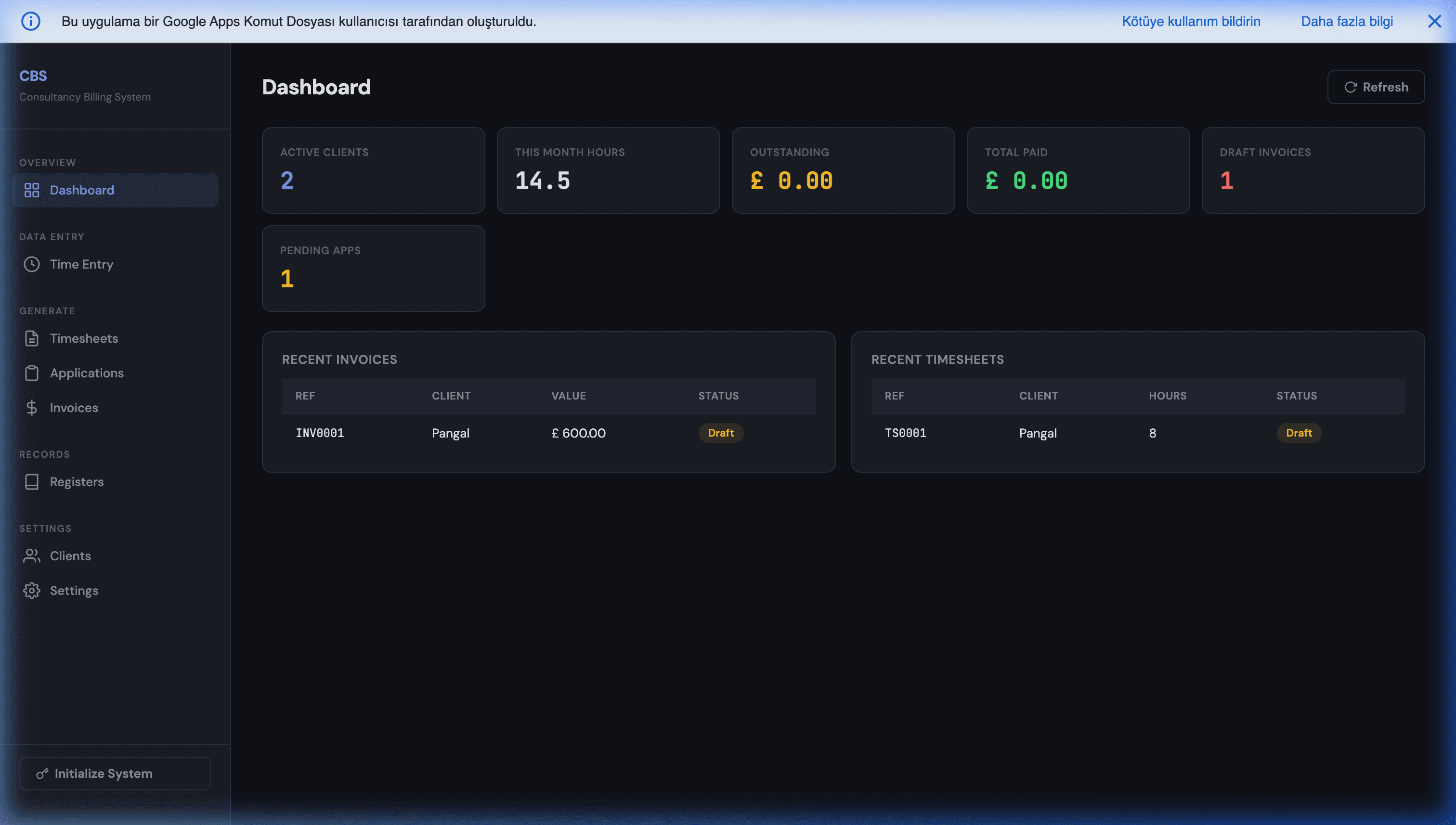
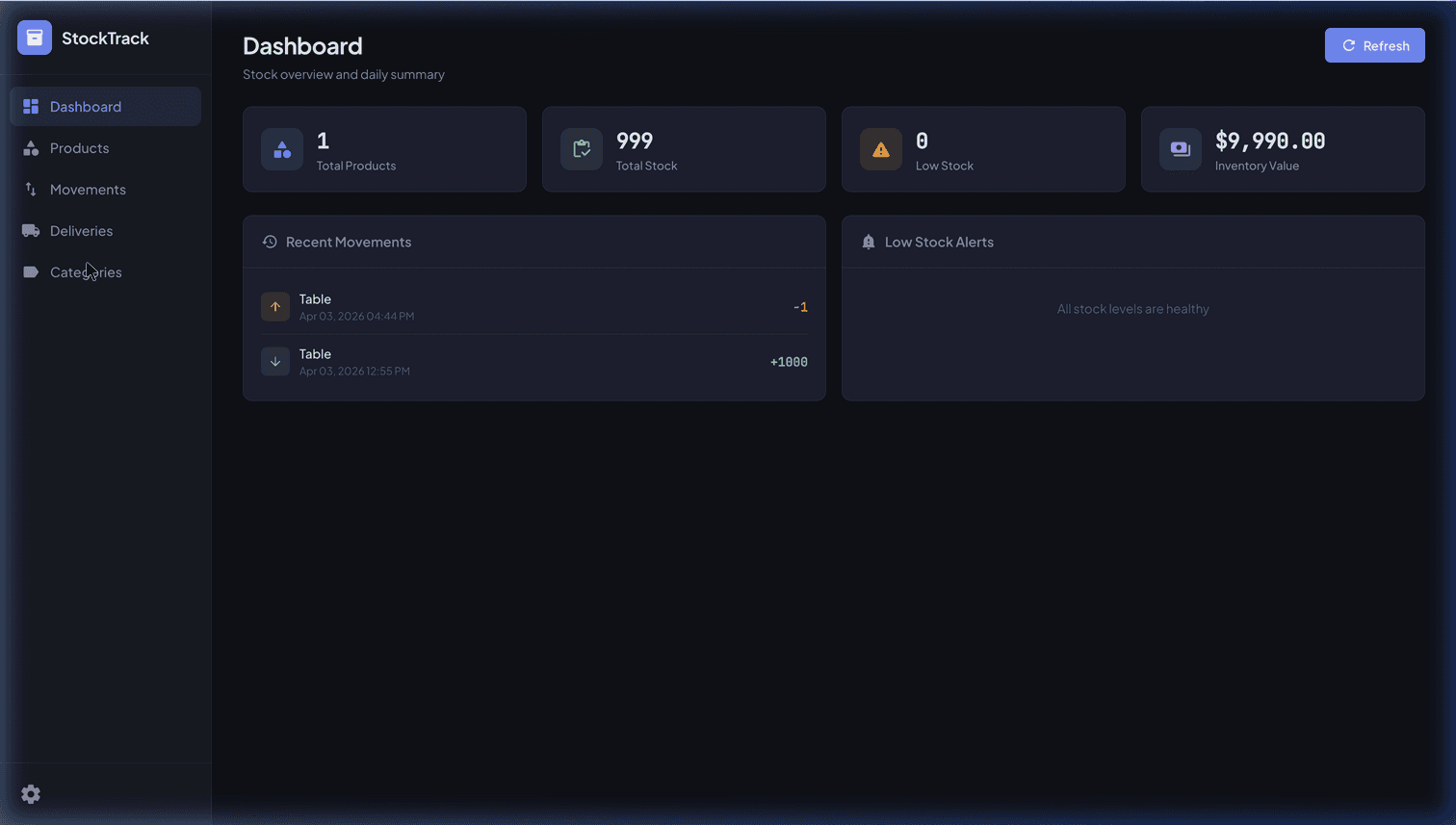
Apps Script is a complete serverless application platform: a V8 JavaScript runtime with first-class access to Sheets, Gmail, Drive, Calendar, and Docs, plus any external API through UrlFetchApp — all running on infrastructure you already pay for with Google Workspace. Teams run real CRMs, billing systems, inventory tools, and customer-facing portals on it at near-zero infrastructure cost.
This is the complete guide to building production software on Apps Script: the UI, authentication, integrations, scale, testing, and AI — and, just as importantly, when to graduate to something bigger. Each section links to the deep-dive guide for that piece.
What Do You Need to Build?
Jump straight to the deep-dive for your problem:
| What you're building | Guide |
|---|---|
| A real web app UI (not raw spreadsheet editing) | Custom frontends with Apps Script |
| Login, sessions & role-based access | Authentication & state |
| A secure per-client portal | Secure client portal |
| Webhooks / a REST API on a Sheet | Apps Script webhooks (doGet/doPost) |
| Reliable external API calls | UrlFetchApp quotas & retries |
| Jobs longer than 6 minutes | Beating the 6-minute limit |
| Tests & CI | Apps Script unit testing |
| AI features (Claude/OpenAI/Gemini) | Claude API in Apps Script |
| Deciding code vs no-code | AppSheet vs Apps Script |
The rest of this guide is the map those pieces fit into.
The Architecture of an Apps Script App
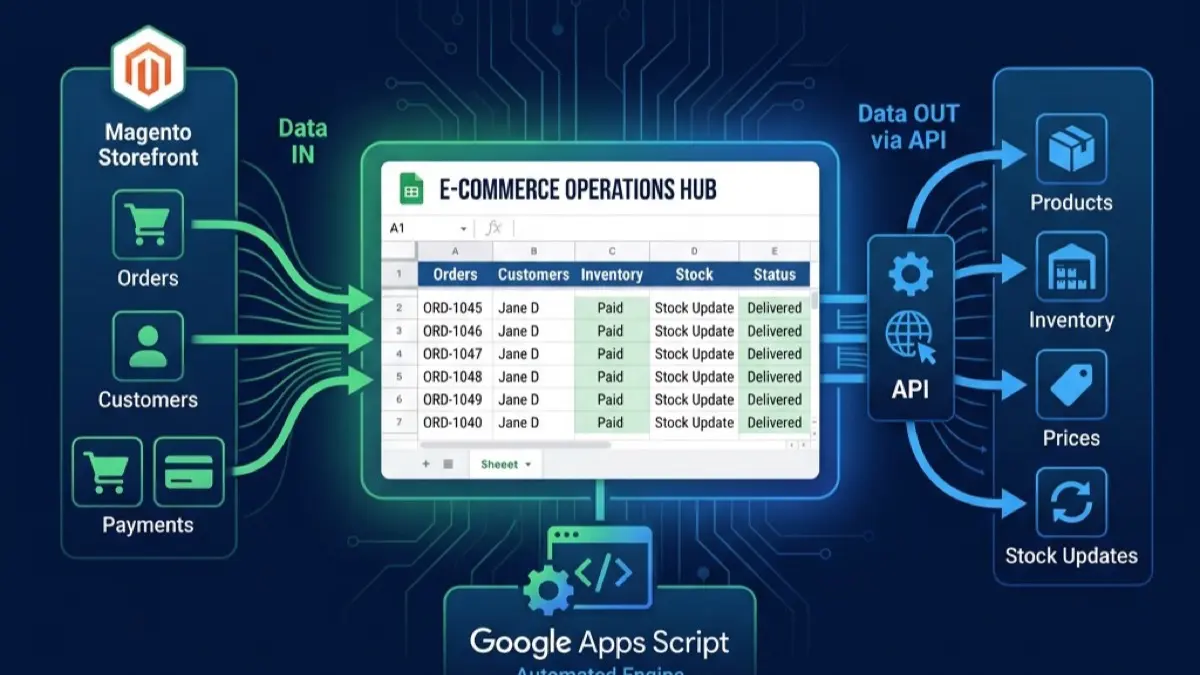
Before the pieces, the mental model. A production Apps Script app is assembled from a small set of primitives, each playing a role you'd normally pay separate services for:
- Google Sheet → your database. Tabs are tables, rows are records. With discipline (an append-only ledger, a
LockServicearound writes) it handles tens of thousands of rows safely. doGet()/doPost()→ your web server. Deploy the script as a web app and these become your HTTP endpoints — serving a UI to humans, or acting as a webhook/REST API for machines.HtmlService→ your frontend. Serves a real HTML/JS app; the browser calls back into server functions viagoogle.script.run.- Triggers → your cron and event bus. Time-driven, on-edit, on-form-submit, and installable triggers run code on a schedule or in response to changes.
UrlFetchApp→ your integration layer. Outbound calls to any external API (Stripe, Magento, OpenAI, Twilio).CacheService/PropertiesService→ your fast state + secrets store. Session tokens, cursors for long jobs, API keys (never hard-code those in the script body).
Almost every guide below is just one of these primitives used well. The skill isn't memorizing APIs — it's knowing which primitive solves which problem, and respecting the platform's limits while you do it.
Building the UI
Out of the box, Apps Script gives you a spreadsheet — which is a terrible interface to hand untrained users. The fix is a real web app front-end built with HtmlService: you serve an HTML/JS single-page app from a doGet() endpoint and call server functions via google.script.run. The result looks and behaves like any modern web app, with forms, dashboards, and controlled access — while the data stays in Sheets. Full pattern: building custom frontends with Apps Script.
Authentication & Permissions
Apps Script has no built-in login or permission system — which trips up everyone the first time. You build it: issue a session token on login, keep it server-side in CacheService, pass it on every request, and gate access with a role column. Add sliding-window expiry, an absolute timeout, and a revocation timestamp for "log out everywhere." Two deep-dives:
- Authentication & state — tokens, sessions, RBAC, the SPA auth pattern.
- Secure client portal — per-client dashboards where each partner sees only their own data.
Talking to Other Systems
A production app rarely lives alone. Two halves:
- Receiving data — turn your Sheet into a headless API.
doPost()/doGet()web-app endpoints become webhook receivers for Stripe, Twilio, Magento, or any service, with HMAC signature verification so only trusted senders can write. See Apps Script webhooks. - Sending data —
UrlFetchAppcalls any external API, but reliability is on you: retry-with-backoff on 429/5xx, a per-source rate limiter, idempotency keys, and respecting the daily quota. The patterns that survive production (plus a dead-letter queue) are in UrlFetchApp quotas & retries.
Running at Scale
The constraint everyone eventually hits is the 6-minute per-execution limit (plus daily trigger-runtime caps). You don't fight it — you design around it with self-rescheduling triggers, chunked state, and parallel fan-out, so jobs that take hours survive crashes and resume where they left off. Full walkthrough: beating the 6-minute limit without Cloud Functions.
Limits & Quotas at a Glance
These are the numbers that actually shape your architecture. Know them before you design, not after a 5 PM failure:
| Limit | Free (Gmail) | Workspace (Business/Enterprise) |
|---|---|---|
| Script execution time (per run) | 6 minutes | 6 minutes |
Web app response (doGet/doPost) | 30 seconds | 30 seconds |
UrlFetchApp calls per day | ~20,000 | ~100,000 |
| Trigger total runtime per day | ~90 minutes | ~6 hours |
| Email recipients per day | ~100 | ~1,500 |
| Sheet size | ~10 million cells | ~10 million cells |
The two that bite hardest are the 6-minute per-run cap and the daily trigger runtime — together they set the real ceiling on how much work you can move per day. Design chunked, resumable jobs and you live comfortably inside them.
Quality: Testing & CI
The reason most Apps Script projects have no tests is that the platform fights you — Jest can't load SpreadsheetApp and the editor has no test runner. There's still a test pyramid that holds up in production, plus a clasp-based CI that runs on every push. See Apps Script unit testing patterns.
Adding AI
Apps Script is a natural place to add AI features — classification, extraction, chatbots, AI-assisted data entry — because the data and the runtime already live together. You call OpenAI, Gemini, or Claude through UrlFetchApp. For tool use, prompt caching, and cost-optimized model routing (and why Claude is worth considering over a reflexive OpenAI default), see connecting the Claude API to Apps Script.
Code vs No-Code
Not everything needs to be code. AppSheet builds a polished mobile/web UI on the same Sheet with no code, and offline support Apps Script can't match — while Apps Script gives you full programming control. Most non-trivial projects use both. The full decision matrix and hybrid pattern: AppSheet vs Apps Script.
When to Graduate
Apps Script is not infinite, and pretending otherwise is how projects get stuck. Graduate when you hit a specific wall: sustained compute beyond the daily quota, real-time/websocket needs, a high-traffic public app, or a UI too complex for HtmlService. The clean path keeps Google Sheets as the system of record and moves compute/UI to Cloud Run or a Next.js app — the data never moves. This is the broader pattern in replacing expensive SaaS with Google Workspace, which covers where the Workspace stack ends and a full web app begins.
Common Mistakes That Break Apps Script Apps
The failures we're called in to fix cluster around the same handful of mistakes — avoid these and you've dodged most production incidents:
- Hard-coding secrets in the script. API keys and tokens belong in
PropertiesService, never in the code body (which ends up in shared projects and version control). - No
LockServicearound writes. Two users hitting the same row at once both read the old value and one overwrites the other — silent data loss. A script lock turns concurrent writes into a safe queue. - Ignoring quotas until they fire. Code that works on 200 records dies on 5,000 with "Service invoked too many times." Build retry/backoff and chunking from the start, not as a patch.
- No checkpointing on long jobs. When the 6-minute timeout hits mid-run, anything not flushed to the Sheet is gone with no rollback. Checkpoint after every batch.
- Storing session tokens in
localStorage. Any XSS exfiltrates every session. Keep tokens in memory for the tab's lifetime and rely on short server-side TTLs. - Treating the Sheet as infinitely concurrent. It's a great database for tens of thousands of rows and modest concurrency — not for hundreds of simultaneous writers. Know the wall before you hit it.
Most of these aren't Apps Script being weak — they're general production discipline that the platform's friendly surface lulls people into skipping.
Get a Free Build Plan
If you're comfortable with JavaScript, the guides above are written to let you build any of this yourself — start with the piece that hurts most and expand.
If you'd rather have it built, that's what we do: bespoke Apps Script systems shipped with 100% source-code ownership, escrow-protected, scaling from a single script to a full web app. Get a free build plan — tell us what you need and you'll get a written, fixed-price plan within 24–48 hours.
Frequently Asked Questions
Is Google Apps Script powerful enough for production software?
Yes, within clear limits. Apps Script is a serverless V8 JavaScript runtime with direct access to every Google Workspace API and any external API via UrlFetchApp. It runs production CRMs, billing systems, inventory tools, and client portals for thousands of businesses. The boundaries you must respect: a 6-minute per-execution limit, a 30-second web-app response ceiling, and daily quotas (e.g. ~20k UrlFetch calls on free, 100k on Business/Enterprise). For most SMB and internal-tool workloads these are invisible; for sustained high-throughput or real-time systems you eventually graduate the compute while keeping Sheets as the data layer.
How do I add login and permissions to an Apps Script web app?
Apps Script has no built-in auth system, so you build one: issue a session token on login, store it server-side in CacheService (or a hidden Sheet for longer sessions), pass it on every google.script.run call, and check a role column for per-user access. Use sliding-window expiry plus an absolute timeout, and a revokedAt timestamp for 'log out everywhere'. The full pattern — tokens, RBAC, multi-device logout — is in our authentication guide, linked below.
How do I get around the 6-minute execution limit?
You don't fight it — you design around it. Three patterns cover almost everything: self-rescheduling triggers (the function checkpoints its progress, exits before the timeout, and reschedules itself), chunked state (process N rows per run, store the cursor in PropertiesService), and parallel fan-out. Done right, you can process hour-long jobs that survive crashes and resume — all on free Apps Script. Full walkthrough linked below.
Can Apps Script call external APIs reliably (Stripe, Magento, OpenAI)?
Yes, through UrlFetchApp — but production reliability needs retry-with-backoff on 429/5xx, a per-source rate limiter, idempotency for writes, and awareness of the daily fetch quota. A script that works against 200 records will fail at 5,000 without these. The reliability patterns (and a dead-letter queue for what retries can't save) are covered in the UrlFetchApp guide below.
When should I move off Apps Script to a 'real' stack?
Graduate when you hit a specific wall, not as a default: sustained compute beyond the daily quota, real-time/websocket features, a public app with heavy traffic, or a UI too complex for HtmlService. The clean migration keeps Google Sheets as the system of record and moves the compute/UI to Cloud Run or a Next.js app — your data never moves. Most teams stay on Apps Script far longer than they expect.
Do I need to be a developer, or can I have this built?
If you're comfortable with JavaScript, the guides linked here are written to let you build it yourself. If not, this is exactly what we do — bespoke Apps Script systems delivered with full source-code ownership, escrow-protected, scaling from a single script to a full web app. Get a free build plan and we'll scope it.