Looker Studio for Magento: Graduating from Google Sheets BI
Congratulations. If you are reading this, it means your e-commerce operation has grown so large that your Google Sheets are finally starting to break.
In Part 1 of our Analytics series, we built a lightweight BI dashboard directly inside Google Sheets. It's an incredible tool for fast, agile reporting. But eventually, every B2B Magento merchant hits "The Wall."
The Wall looks like this:
- Your "Raw Sales" tab surpasses 5 million cells, and the spreadsheet takes 20 seconds to load.
- You have 15 different executives who all want to click, filter, and drill down into the data simultaneously.
- You need to securely share a dashboard with an external Vendor, but you absolutely cannot let them accidentally click on the underlying raw data tab.
When you hit The Wall, it's time to graduate from Google Sheets to Looker Studio (formerly Google Data Studio).
What is Looker Studio?
Looker Studio is Google's free, enterprise-grade data visualization platform. It acts strictly as a "Presentation Layer." It stores absolutely no data itself; instead, it reaches out to data sources (like Google Ads, BigQuery, or Google Sheets), asks for the numbers, and paints beautiful, interactive infographics on a web canvas.
Here are three reasons why B2B Magento merchants should migrate their final reporting to Looker Studio:
1. The Multi-Channel Mashup
Looker Studio allows you to blend data sources on the fly.
Imagine a single line chart. The Blue Line is your Magento Sales Revenue (pulled from a custom MySQL/BigQuery connector). The Red Line is your Google Ads Spend (pulled automatically via the native Ads connector).
You don't have to write complex VLOOKUP or INDEX(MATCH) formulas to align the dates. Looker Studio's "Data Blending" feature joins them automatically based on the Date dimension.
2. Bulletproof Permissions (Row-Level Security)
In B2B, you might have 5 regional sales managers. You want them all to use the exact same dashboard, but Manager A should only see data for "West Coast," and Manager B should only see data for "East Coast."
If you do this in Google Sheets, you have to create 5 different spreadsheets and maintain 5 sets of formulas. In Looker Studio, you use Row-Level Email Filtering. The dashboard looks at the Google account of the person viewing it, and dynamically filters the underlying data so they only see what they are allowed to see.
3. Client-Facing Professionalism
If you run a B2B wholesale portal and want to give your top 10 VIP clients a "Spend Analysis" report, sending them a link to a Google Sheet looks amateurish. Sending them a branded, embeddable Looker Studio report with your company logo and interactive map charts looks like a million-dollar enterprise solution.
The Migration Path: Magento -> BigQuery -> Looker
How do we actually get Magento 2 data into Looker Studio?
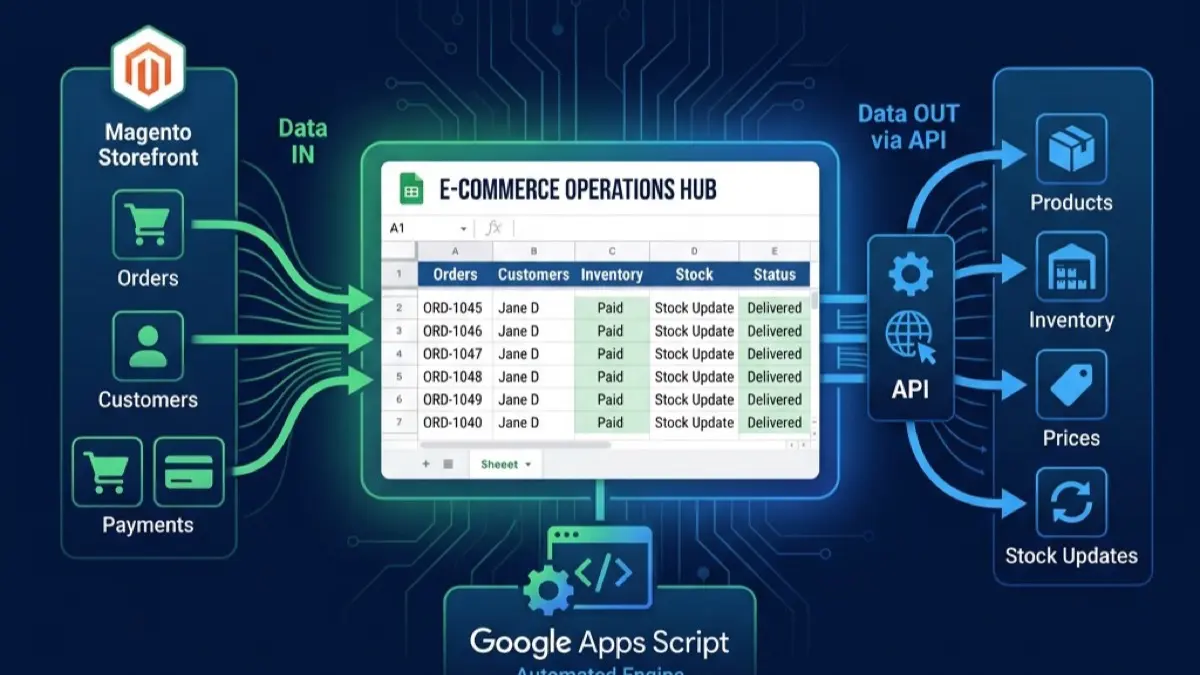
You can connect Looker Studio directly to a Google Sheet, but if your data is massive, it will still be slow. The ultimate enterprise architecture looks like this:
- Extraction: A scheduled script (or a tool like Fivetran) extracts daily orders, customers, and catalog data from your Magento MySQL database via REST APIs.
- Data Lake (BigQuery): The data is dumped into Google BigQuery, Google's serverless data warehouse. BigQuery can search terabytes of data in milliseconds.
- Visualization: Looker Studio uses the native BigQuery connector.
When a user in Looker Studio clicks a filter to view "Q3 Spikes in Hardware Sales," Looker instantly sends a SQL query to BigQuery. BigQuery crunches millions of Magento order rows in roughly 0.4 seconds, and Looker immediately redraws the pie chart.
Don't Throw Away Apps Script
Migrating to Looker Studio doesn't mean your Apps Script skills are useless. In fact, Apps Script remains the ultimate "Glue."
While BigQuery handles the massive heavy lifting of historical Magento orders, you can still use Apps Script to pipe niche, lightweight data into Google Sheets, which Looker Studio can then ingest as a secondary data source.
For example, your Sales Team's manual "Daily Goal Targets" are best typed into a simple Google Sheet. Looker Studio can blend that dynamic Sheet data with the massive BigQuery sales data to show pacing metrics.
Conclusion
Scaling an e-commerce business is about knowing when to use the right tool.
- Use Magento for complex catalog rules and transactional checkout.
- Use Apps Script for lightweight API routing and automations.
- Use Google Sheets for agile, collaborative data manipulation.
- Use Looker Studio & BigQuery for macroscopic, executive-level data visualization.
At MageSheet, we architect the entire pipeline. If you are struggling to pull meaningful, real-time insights out of your Magento store, let us build your enterprise data stack. Contact us today.