
Magento AI Product Manager
Upload products to Magento from a spreadsheet — AI figures out where every column belongs, so you don't have to.
Paste or drop your supplier spreadsheet, click one button, and Magento AI Product Manager uses GPT-5.4 to match every column to the right Magento field — SKU, price, stock, color, size, descriptions, even product images. Review the AI's choices in a simple grid, confirm, and thousands of products are on your store minutes later. No Magento extension to install. No monthly subscription. Runs entirely inside your own Google Workspace. Pay once, own it.
The Problem
Why this matters
Adding products to Magento is painful for small teams. Supplier spreadsheets never match Magento's required columns — supplier says 'Color_Code', Magento wants 'color'; supplier says 'QTY_Stock', Magento wants 'qty'. You end up copy-pasting cells for hours, fighting Magento's fragile CSV importer, and still seeing 'Upload failed — attribute not found' errors at midnight. PIM software that fixes this costs $200–$2,000 per month and locks your catalog behind another login. For a store with 500 SKUs, the math never works.
The Solution
How we solve it
Magento AI Product Manager turns your Google Sheet into a catalog staging tool. Drop your messy supplier file in, hit 'AI Map & Send', and a modern AI model reads your columns and sample rows — then tells you exactly which Magento attribute each column should become, with a confidence score. Review in a clean grid, change anything you don't like, and hit Confirm. Products are pushed straight to your store through Magento's own API — no CSV files, no upload timeouts, no extensions to install on your Magento backend. You see a live progress bar row-by-row, can cancel mid-sync, and get a downloadable error log when it's done.
The Results
What you get
- Turn a supplier CSV into a live Magento catalog in minutes, not days
- AI auto-maps columns — no more matching 'Color_Code' to 'color' by hand
- Upload simple, configurable (size/color variants), and multi-image products from one sheet
- Live progress bar with row-by-row status — you see exactly which SKU succeeded or failed
- Cancel a sync mid-way, fix the bad rows, and resume — no more all-or-nothing CSV horror
- Download a per-row CSV log of every sync for your records and finance team
- Keep all catalog data in your own Google Sheet — export, back up, or migrate anytime
- Replace $100–$2,000/month PIM subscriptions with a one-time purchase you own forever
Interactive Product Tour
A click-through demo with realistic sample data. Browse tabs, filter tables, explore the UI. Save, import, and other write actions happen for real in the live app — one click away.
Key Features
AI That Reads Your Columns For You
Powered by OpenAI's latest models (GPT-5.4 by default, or pick the cheaper Nano for simple sheets). Drop any supplier file — even with weird column names like 'PROD_SKU_MAIN' or 'UNIT_PRICE_USD' — and the AI matches each column to the correct Magento attribute with a confidence score. Works even with columns you invent yourself.
Drop In Any File Format
CSV, Excel (XLSX), TSV, or a Google Sheet — the import tab accepts all of them. Already using Google Sheets for your catalog? Pick a tab, hit Load, and you're ready. No need to convert files, no Excel-specific headaches.
Spreadsheet-Style Editor
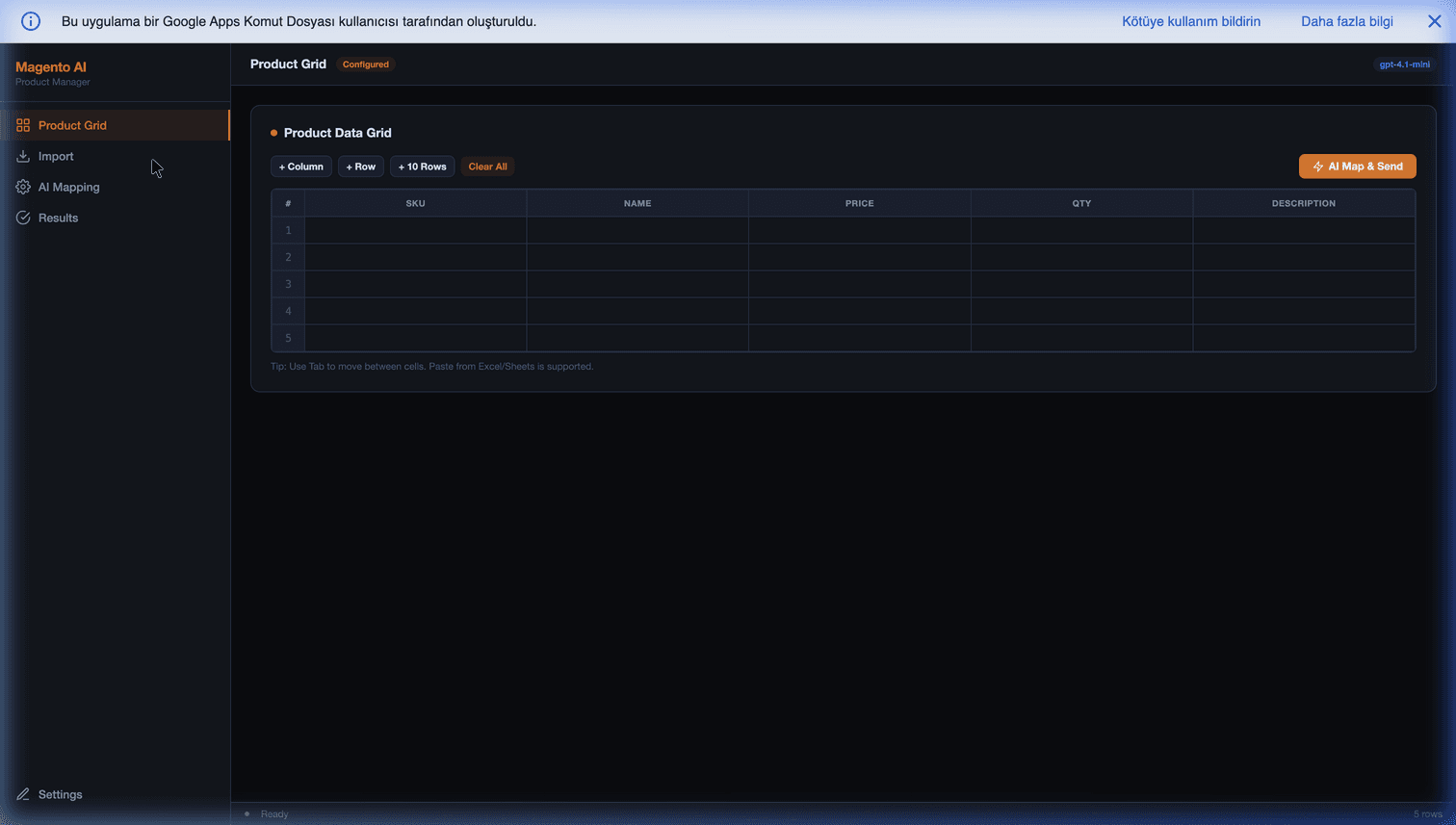
A dark, premium grid where you can paste from Excel, tab between cells, add or delete columns, and review every row before sending. Looks like your spreadsheet — feels faster, and connects directly to Magento.
Direct API Sync — No Extensions, No CSV Files
Products go to your Magento store through Magento's own REST API — the same one Magento's admin panel uses. Nothing to install on your Magento backend, no CSV import failures, no 'attribute not found' mid-upload. Sends products in batches of 15 for speed and Apps Script timeout safety.
Configurable Products, Done Right
Have T-shirts with sizes and colors? List the parent row once, then the child variants, and the tool sets up the configurable attributes and child linking automatically. Works with Magento 2.4+ (values are populated correctly for you).
Image Upload From URL
Put a public image URL in any column — the tool fetches it, uploads it to Magento's media gallery, and sets it as the product's main image, all in one go. No FTP, no manual image upload for every SKU.
Real-Time Progress + Cancel Anytime
See a live progress bar, per-row success or error status, and the exact Magento error message if something fails. Hit Cancel any time — the current row finishes, nothing is left half-synced. Download the whole log as a CSV when you're done.
Your Data Never Leaves Your Google Workspace
Only column headers and three sample rows go to OpenAI (so it knows what to map) — never your full catalog. Product data goes straight from your Google Sheet to your Magento store. Your API keys live in Google's encrypted Script Properties. No MageSheet server in the middle, ever.
Google Workspace Integration
Works seamlessly with your favorite Google apps
What Does It Bring to Your Business?
Real business value, not just cool tech
Pay Once, Own Forever
A one-time purchase replaces $100–$2,000/month PIM subscriptions. No seat licenses, no per-product fees, no annual renewal — your copy of the tool is yours for life.
Catalog Uploads In Minutes, Not Days
A task that took your team 3 days of copy-pasting now takes an hour — AI does the column matching, you just click Confirm.
Stop Fighting Supplier Spreadsheets
Every supplier sends you columns named differently. The AI figures it out every time — you never manually match 'Color_Code' to 'color' again.
Your Data Stays With You
Everything runs inside your own Google Workspace. We don't have servers in the middle, can't see your catalog, and can't read your Magento token even if we wanted to.
Faster Time-to-Market
New supplier catalog Monday morning? Live on your store by lunch. Your competitors are still reformatting CSVs — you're already selling.
100% Yours To Modify
The source code is unencrypted, readable JavaScript inside your own Google Apps Script. Your developer can tweak mapping logic, add custom fields, or integrate with your ERP — no reverse engineering needed.
Simple Pricing
Choose the plan that fits your needs
Standard
Script only — install it yourself, no support
- AI column mapping — works with any spreadsheet format
- CSV, Excel, TSV, and Google Sheet import
- Direct Magento 2 REST API sync (no extension needed)
- Configurable products (size/color variants) handled automatically
- Image upload from URL — straight to Magento media gallery
- Batch sync with live progress, cancel, and CSV error log
- 100% unobfuscated source code — yours forever
- 1 year of free updates (renewal at 50% after)
- Eligible for 14-day refund under our Refund Policy
Managed
Script + professional installation + 2 weeks free support
- Everything in Standard
- We configure your provided Magento & OpenAI credentials
- We deploy and test the script in your Google Workspace
- We run a test sync with a small sample of your real products (typically 5–10)
- 2 weeks of priority support for mapping questions
- *Requires an active OpenAI billing account & Magento Admin access on your side
Custom+
Everything in Managed + custom features built on top
- Everything in Managed
- Custom feature development on top of the script
- Tailored to your specific workflow
- Delivered via Upwork (escrow protection)
- Full source code ownership
You own it forever — 100% unobfuscated source code, no subscription, no lock-in. Secure checkout via Gumroad.
Not sure it fits your setup? Ask us on WhatsApp before you buy →
Frequently Asked Questions
Everything you need to know
No. Magento AI Product Manager uses the REST API that already ships with every Magento 2 store — the same API your admin panel uses. You just create an Integration Token in Magento Admin (System → Integrations), paste it into the tool's settings, and you're connected. No modules to upload, no composer commands, no developer mode. If your hosting is managed, you don't need to call your hosting company.
Yes, if you can copy-paste. Standard plan comes with a setup guide anyone can follow in typically 15–30 minutes. If that sounds like work, grab the Managed plan — we install the core system on your Google account for you. (Please note: To keep costs predictable, Managed covers system deployment; generating your initial OpenAI API key or opening firewall ports on your Magento server remains your responsibility).
Magento 2.3, 2.4+ (including the latest 2.4.8), Magento Open Source, and Adobe Commerce. The tool uses the stable /rest/V1/products API, which has been unchanged for years. Magento 1.x is not supported. If a future Magento release breaks anything, you get the patched version free during your update year.
In most cases, yes — that's the whole point of the AI. Whether your spreadsheet calls the price column 'Price', 'Retail_Price_TL', 'USD-PRICE' or 'fiyat', the AI reads the column values and matches it to Magento's 'price' field. Same for SKU, name, stock, color, size, descriptions, and images. Custom attributes that already exist in your Magento backend are also detected automatically. For the rare column the AI can't figure out, you override it with one dropdown click.
Fully supported. List your parent product once with type_id = 'configurable' and the variant attribute names (e.g. 'color,size'). Then list each child variant (Red-S, Red-M, Blue-S, etc.) with type_id = 'simple' and the parent's SKU in a parent_sku column. The tool creates the parent, sets up the configurable attributes, uploads each child, and links them — all automatically. Works with Magento 2.4+ requirements out of the box.
Only what you pay OpenAI for the AI column mapping — and that's tiny. The AI runs once per upload batch, reading only your column headers and 3 sample rows. For most small stores uploading 100–1,000 products a month, OpenAI usage costs under $1/month with the default fast model (GPT-5.4 Mini). There are no other ongoing fees — no per-product charges, no seat licenses, no subscription to us. Magento's API itself is free to use.
Yes. Click the live demo link on this page and you'll land in a fully working version of the app — with 5 sample products loaded, AI mapping running, a simulated sync, CSV export, and every settings screen. Click through it, try the buttons, see the UI. Nothing is saved to any real Magento store; it's our showroom so you can judge the product before paying anything.
Your product data never leaves your Google Workspace. The tool runs entirely inside your Google account: your Sheet stores the catalog, the script talks directly to your Magento store's API. Only the column headers and 3 sample rows go to OpenAI so the AI can figure out the mapping — your full catalog, prices, stock, and customer-facing descriptions never touch our servers (because we don't have servers in the data path). Your Magento token and OpenAI key are stored in Google's encrypted Script Properties, not in the sheet itself.
No. One-time purchase — see the package selector for current pricing. You own your copy forever and keep using it even if we vanish tomorrow. The only ongoing costs are OpenAI for AI calls (usually under $5/month for most stores) — paid directly to OpenAI at their public rates.
Yes. Your purchase includes 1 full year of free updates — new features, bug fixes, support for new Magento and OpenAI versions. After the first year, you keep the version you have forever, and updates can be renewed at 50% of the current price. We release updates often; Gumroad will email you each time a new version is ready to download.
By purchasing, you agree to our Refund Policy at magesheet.com/refund-policy — a 14-day refund window under specific conditions, primarily non-delivery or a critical, reproducible defect that we cannot resolve within a commercially reasonable timeframe after you have provided the required setup (Magento Integration Token, OpenAI billing account) and diagnostic information. Refunds are not available once you have successfully completed your first product sync. For the Managed plan, a refund is available before the install has been scheduled; once we begin work, the Managed price differential over Standard is non-refundable.
Yes — that's what the Custom+ tier is for. If you need the tool to talk to your ERP, pull prices from a specific supplier API, handle a unique attribute structure, or integrate with your internal systems, we build it on top of the base script and deliver through Upwork (escrow-protected). You still own the full source code. Get a quote via the WhatsApp button on this page.
Yes. The tool sends products in batches of 15 with automatic retries, built-in exponential backoff on rate limits, and cancel/resume support — so you can run big uploads in sessions without hitting Google Apps Script's 6-minute limit. For very large catalogs, we recommend splitting by category or supplier and using the batch sync a few times. If you have a 50,000+ SKU catalog and need continuous sync, talk to us about a Custom+ build.
Your catalog lives in your own Google Sheet. Export it to CSV, Excel, or any other format — you own the data. The script itself is yours too (100% readable JavaScript in your own Google account). There's no lock-in: you can walk away anytime with everything, and we keep no copy.
Ready to get Magento AI Product Manager — or want your own version built?
Buy it from $129, or book a free feasibility review.